The short answer: replay preserves sequence that a final diff throws away
Code review usually begins with the final tree because that is the artifact that ships. But the same final patch can come from very different paths: inspect first and edit once; edit immediately and then repair; repeatedly touch one test; bounce between two modules; or spend most of the run reading files that never appear in the diff. Those paths matter when you are debugging an agent workflow or trying to understand a long autonomous run after the fact.
Agent Nebula turns ordered repository file actions into a replay. Files are the visual objects, path areas use stable grouping, and agent actions advance the timeline. The useful claim is deliberately bounded: the replay makes the repository trajectory visible. It does not turn file movement into a reliable explanation of why the model chose an action.
You do not need to have recorded the run with eBPF
The current agentsight vis path is agent-native. Run it inside a Git worktree and it scans matching local Claude, Codex, and Gemini sessions, then builds the repository replay from the Tool actions those agents already saved. The product README explicitly lists vis among the Windows, macOS, and Linux commands that can operate from native session files without eBPF. That makes repository replay useful for a common retrospective case: the agent already worked for hours or days, no system recorder was running, and you now want a compact process view.
cd your-repository
agentsight vis

# Generate a self-contained interactive artifact instead of the default GIF
agentsight vis -o output/agent-nebula.html
This boundary is important. Native session history can recover what the agent logged as Tool actions and file targets. It is not equivalent to an independent kernel trace of every descendant process or every filesystem operation. If the review requires proof of low-level effects, pair the replay with a recorded system trace rather than upgrading the native log into stronger evidence than it actually contains.
Worktree matching is part of the reconstruction
A machine can hold many projects and many agent sessions. Agent Nebula therefore needs a repository boundary before it can make a meaningful timeline. The current agentvis documentation says normal discovery includes sessions whose working directory, project identity, or Git remote belongs to the worktree. That is more useful than merely asking whether a transcript file happened to be created while your shell was inside the repository.
--global broadens discovery when the relevant session was rooted elsewhere. The flag scans every local session and retains operations that target the repository being visualized. This is useful for agents launched from a parent workspace, monorepo orchestration, or other cases where session cwd is not a sufficient project key. It also gives the flag a concrete meaning: global discovery does not mean “draw every file the agent ever touched.” The repository remains the visualization boundary.
A missing file effect should remain missing, not become a guessed edit
A replay becomes misleading if it fills gaps with plausible-looking behavior. The current agentvis contract keeps each retained Tool action on the timeline even when no repository file effect can be proven. In that case the layout frame stays unchanged instead of inventing a read or write. This small rule is one of the most important properties of the visualization: time can advance without the picture pretending that a file changed.
The deeper Agent Nebula design contract uses the same observation/interpretation split. Native agent actions describe what the agent invoked; optional system observations can describe real file effects; semantic text is needed to answer “why.” Those sources can be correlated, but none should silently stand in for another. Even when you only use the native-session path, that distinction is a good rule for reading the replay.
Diff, transcript, repository replay, and system trace answer different questions
| View | Best question | What it loses |
|---|---|---|
| Final diff | What source state changed? | Exploration order, failed attempts, reads, and intermediate edits. |
| Agent transcript | What did the agent say, request, and receive? | Compact spatial understanding of how attention moved through the repository. |
| Repository replay | How did file-focused activity move through the codebase over time? | Intent that was not explicitly logged and low-level effects absent from native actions. |
| System trace | Which processes and filesystem/network effects actually occurred? | Model intent and application semantics unless separately correlated. |
The practical workflow is usually compositional rather than competitive. Start with the replay to find a phase or repository region worth inspecting, open the final diff to review the resulting code, then return to the transcript or a system trace when the question becomes semantic or forensic.
The picture is a time series, not a heatmap of the final repository
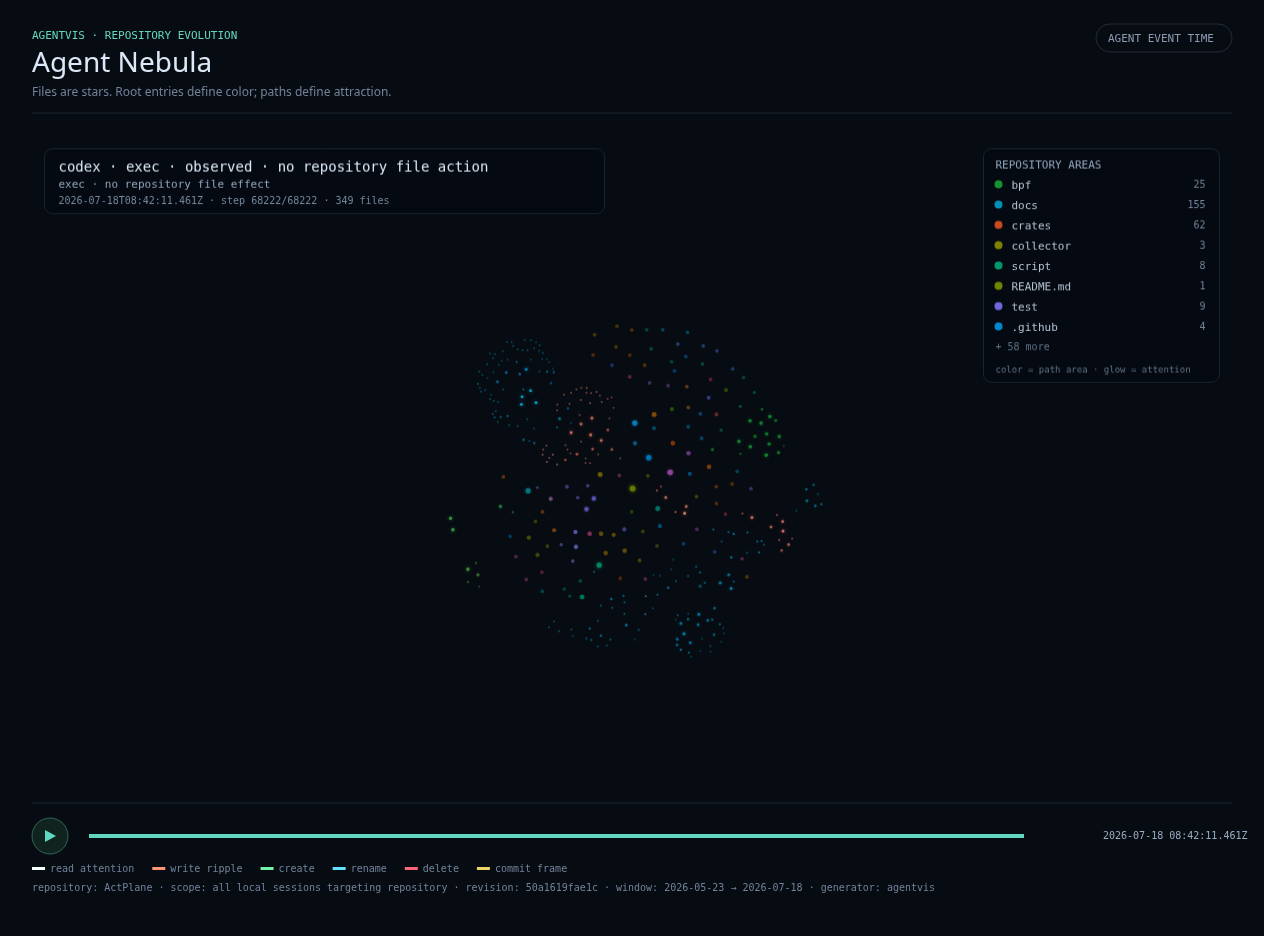
A conventional file heatmap can tell you that one module was touched frequently. Repository replay adds order: where the agent started, whether attention stayed concentrated, when it crossed directory boundaries, and whether it returned repeatedly to the same region. That sequence is often the useful clue in autonomous coding work, because “the agent edited these 12 files” does not tell you whether the work was a clean progression or a long loop of revisits.
Media compaction changes playback density, not the underlying HTML action history
Long-running agents can produce too many action frames for a useful GIF or MP4. The current agentvis CLI therefore has one media compaction control: --compact-rate, defaulting to30s. The documentation describes the selection as uniform by action, encoded at 30 fps. Use --compact-rate full when every action should become a media frame.
HTML has a different contract: it keeps every action and ignores media compaction. That makes the self-contained HTML artifact the better review surface when exact step coverage matters, while a compact GIF or MP4 is better for quick communication. A reviewer should not mistake a visually compressed media export for a lossy source dataset; the choice of output format is part of how the replay is consumed.
agentsight vis . --global \
  --compact-rate 30s \
  -o output/agent-nebula.html \
  -o output/agent-nebula.png \
  -o output/agent-nebula.gif \
  -o output/agent-nebula.mp4
Use HTML when you need a portable review artifact
The default AgentSight replay is a GIF. GIF generation needs local Chromium and FFmpeg, while the product README documents self-contained HTML as the dependency-light alternative. The standalone agentvis implementation can also emit PNG, SVG, GIF, and MP4, and repeated -o arguments share one session scan and layout calculation. That lets one reconstruction produce both an interactive artifact for inspection and smaller media for a pull request, issue, or research note.
“Portable” does not mean “non-sensitive.” Repository paths, project structure, timing, and action shape can themselves disclose information. Review an artifact before sharing it outside the environment where the sessions originated, just as you would review a trace export or profiling report.
What the replay cannot tell you by itself
A bright path through tests followed by source files may suggest a test-first workflow, but the visual pattern alone cannot prove the agent’s reasoning. A repeatedly visited file may represent productive iteration, a failing loop, or a normal generated artifact. A Tool action can also omit lower-level work done by a child process. The safe interpretation is behavioral: these file-focused actions happened in this order according to the available session data.
When “why?” matters, return to the original session content and tool results. When “what actually happened on the machine?” matters, use system-level process/file/network observation. When “is the final code correct?” matters, review the diff, tests, and product behavior. Repository replay is strongest as an index into those deeper questions, not as an automatic verdict about agent quality.
A practical review sequence for a long coding-agent run
Start in the repository and create the HTML replay. Scan the whole trajectory once without opening the transcript. Identify one or two intervals that look unusually repetitive, unusually broad, or centered on files outside the expected task area. Then inspect the final diff and Git history for those regions. If the sequence still needs explanation, open the native session around the corresponding Tool actions. If the concern is an unlogged subprocess or external file effect, reproduce it under AgentSight’s system recorder.
This sequence keeps each source doing the job it is good at. The replay compresses a long history into a navigable shape; the diff establishes final source state; the transcript restores intent and tool context; the system trace supplies independent low-level effects. For multi-day agent work, that is often much faster than reading every JSONL event in chronological order and much safer than inferring a whole story from the final patch.
The current compatibility boundary is intentionally narrower than “all coding agents”
At AgentSight v1.0.26, the documented repository replay scans local Claude, Codex, and Gemini sessions. Other AgentSight surfaces support additional agents and system-capture paths, but that does not imply the same native-session replay compatibility. Treat the current README and agentvis source at commit 92d634ec02d1 as the compatibility reference, especially because local transcript formats and vendor storage layouts can change independently of the visualization itself.
Primary sources
- AgentSight v1.0.26 README: current agentsight vis workflow and platform boundary
- agentvis v1.0.26 README: repository scoping, output formats, compaction, and action retention
- agentvis v1.0.26 CLI source: path, --global, output, and --compact-rate contract
- Agent Nebula design contract: action/effect/intent boundaries and repository projection model
- Pinned ACTplane Agent Nebula example used in this article